Why does my speaker stay silent when I plug in a USB stick and keep showing AUX or LINE on the screen?
Your flash drive works fine, yet the amplifier refuses to play it. Before you blame the drive, check whether the front panel is still stuck on line-in instead of USB mode.
It is a classic head-scratcher: you load a USB stick with songs on your computer—or unbox a new USB audio stick—plug it into your home amplifier or wheeled party speaker, and get complete silence. Most people immediately assume the flash drive is dead and try two or three other sticks from the drawer with the exact same result. Before you give up, lean in and look at the little screen on the speaker: nine times out of ten it still reads `AUX` or `LINE`, or the speaker announced "Auxiliary Input" when you flipped the power switch.
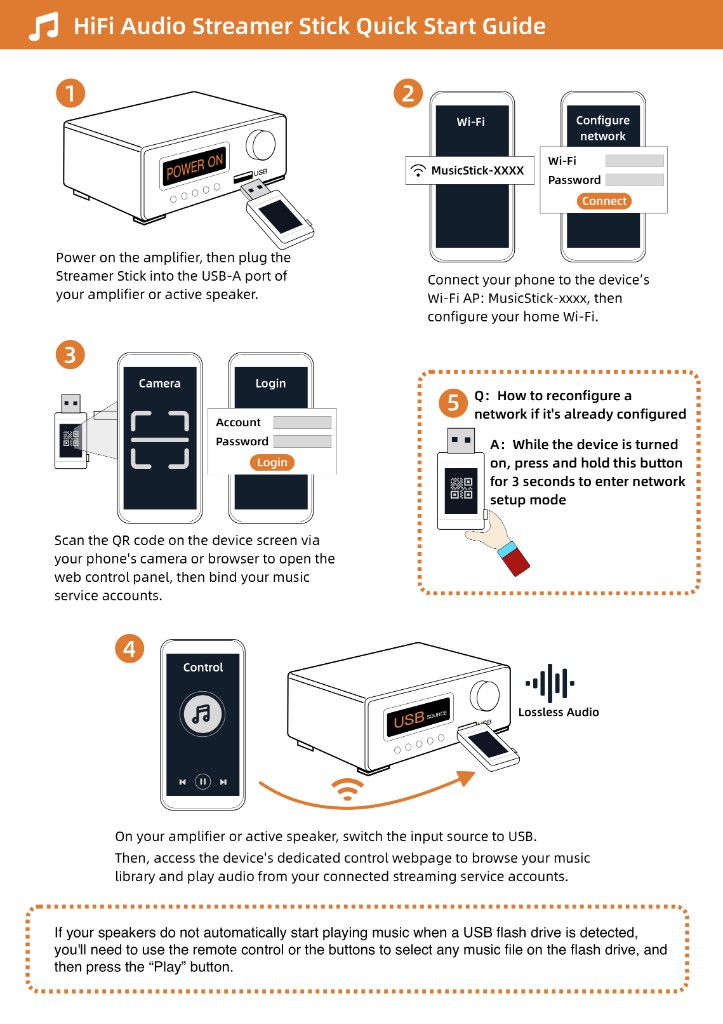
Nothing is wrong with your USB stick; the amplifier is simply still listening to the audio cable jacks on the back and ignoring the USB socket completely. Look on the front panel or the remote control for a button labeled `MODE`, `INPUT`, or `USB`. Press it once or twice until the letters on the little display change to `USB`, and the music usually starts right up. If the screen already says `USB` and you still hear nothing, check two other things: first, plug the stick into a computer and make sure it is formatted as `FAT32`; second, check whether that USB port actually carries data—some speakers include a 5V USB socket strictly for charging a phone, and pressing `MODE` will never make it read files.
Once pressing the mode button gets a regular MP3 flash drive playing, you can plug a Raywav Stick into that same port and use it every day. Pick your radio station or playlist from your phone's browser, and the physical play and pause buttons on the speaker's front panel will still work as usual.