I use a 3.5mm AUX cable to connect my phone to the amp — what do I do when the phone battery dies?
An audio cable never drops like Bluetooth, but it chains your phone to the amp and blasts message pings through the speakers. Using the amp's USB port frees the phone completely.
Plenty of people get so fed up with Bluetooth dropouts that they grab a 3.5mm-to-RCA audio cable (an `AUX` cord), plug one end into the back of their old amplifier, and plug the other end into a phone or tablet. It is a solid, no-nonsense fix: as long as nobody trips over the cord, the connection never drops. Then the everyday annoyances start showing up. That phone is now physically tied to the amplifier on a three-foot leash. Every time a WhatsApp or text message arrives, the notification chime blasts out of the big speakers and ducks the music down; and by mid-afternoon when the phone battery runs low, the moment someone unplugs the cable to go charge the phone, the entire shop or living room goes dead silent.
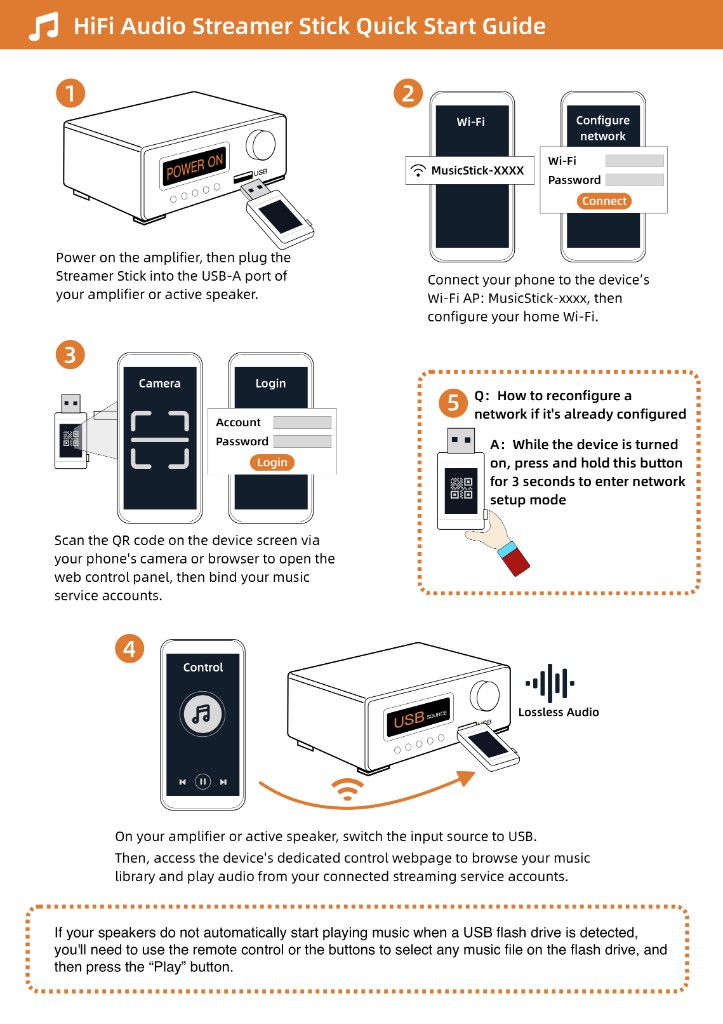
If you want cable-solid playback without tethering your phone to the stereo, take a look at the front panel of your amplifier and see if there is a rectangular USB port for a flash drive. Plug a regular USB stick with a couple of MP3s into it—if the speakers start playing, your amp already knows how to play digital audio on its own.
Plug the Raywav Stick into that USB socket and let it join your Wi-Fi. From then on, the stick pulls your music subscriptions, internet radio, podcasts, or songs from a home hard drive directly over the network. You only touch your phone for the few seconds it takes to open the browser page and tap play; after that, you can unplug the phone, put it on a charger across the room, or walk out the door with it in your pocket while the amp keeps singing. Leave the old `AUX` cable coiled up beside the amp for the rare afternoon when a visiting friend wants to play a voice recording off their phone.