All my ripped CDs sit on a home NAS drive — how do I play them on my old living room amplifier?
You spent weeks ripping hundreds of CDs to a network drive in the study, but your living room stereo only has a USB port. Here is how to browse your NAS folders straight from the couch.
Maybe you spent weekends ripping hundreds of old CDs into clean audio files and organizing them neatly on a NAS network hard drive in your study. The plan was to sit back on the living room sofa and play any album you wanted—until you remembered that the trusty old amplifier in the TV cabinet has no network jack at all, just a rectangular USB slot on the front. Having to walk into the study to boot up a computer or copy albums onto a thumb drive every time you want to hear a record takes all the fun out of it.
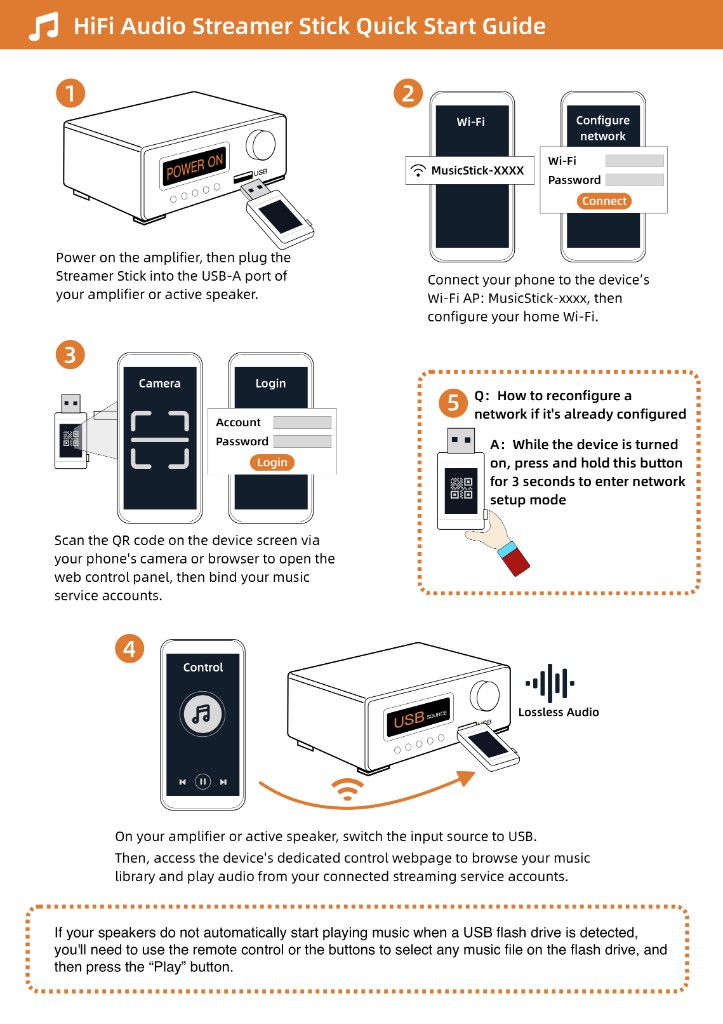
As long as your amplifier's USB port can play a normal MP3 flash drive, bridging the gap to the study is simple. Plug a Raywav Stick into the amp's USB socket, let it join your home Wi-Fi, and open its web page on your phone to connect straight to that network drive. You will see two ways to browse the drive: `SMB`, which works just like opening a shared folder on a home computer and shows your exact folder tree, and `DLNA`, which reads the music index built by the NAS itself. Tap into both for thirty seconds—whichever one shows your artist and album folders the way you like them is the one to use, and you can ignore the other.
One practical detail worth watching: many living room amps sit tucked inside a wooden console or a metal rack that blocks a lot of Wi-Fi once the door is shut. If big lossless files take a moment to buffer, do not leave the stick jammed flat against the metal backplate of the amp—plug it into the front panel or use a short USB extension cord to bring it toward the front edge of the shelf. Pick your album, lock your phone, and the amp will play through the whole record track by track on its own.