We play music from a phone over Bluetooth at the shop — why does it cut out whenever someone walks to the back room?
When your phone sends Bluetooth music to the shop amp, walking ten meters away or getting a phone call kills the sound in the room. Moving playback to the amp's USB port keeps music running all day.
Almost anyone who runs a café, salon, or small shop has lived through this routine: you open up in the morning, pair your phone to the shop amplifier over Bluetooth, and start a background playlist. Half an hour later, you walk into the back kitchen to check an invoice or step outside the front door to sign for a delivery—ten meters away, the ceiling speakers let out a sharp crackle and go dead. Even if you leave the phone sitting on the cash desk, the moment a customer calls the shop line or a voice note pops up on your screen, the music cuts out and nearly broadcasts your private call to the whole room. By noon the phone needs a charger, and the dining room sits in silence.
That happens because with Bluetooth, your phone is doing all the work while the amplifier is just a dumb loudspeaker at the end of a short radio leash. To cut the leash, look at the front of your amplifier for a USB stick port. Plug in a regular flash drive with an MP3 song on it, turn off your phone's Bluetooth, and walk into the back room. If the speakers keep singing, your amp already has its own player built in. If the stick stays quiet, press the `MODE` button on the panel to switch the input to `USB`; if it still never reads a basic `FAT32` stick, that socket is only wired for charging a phone.
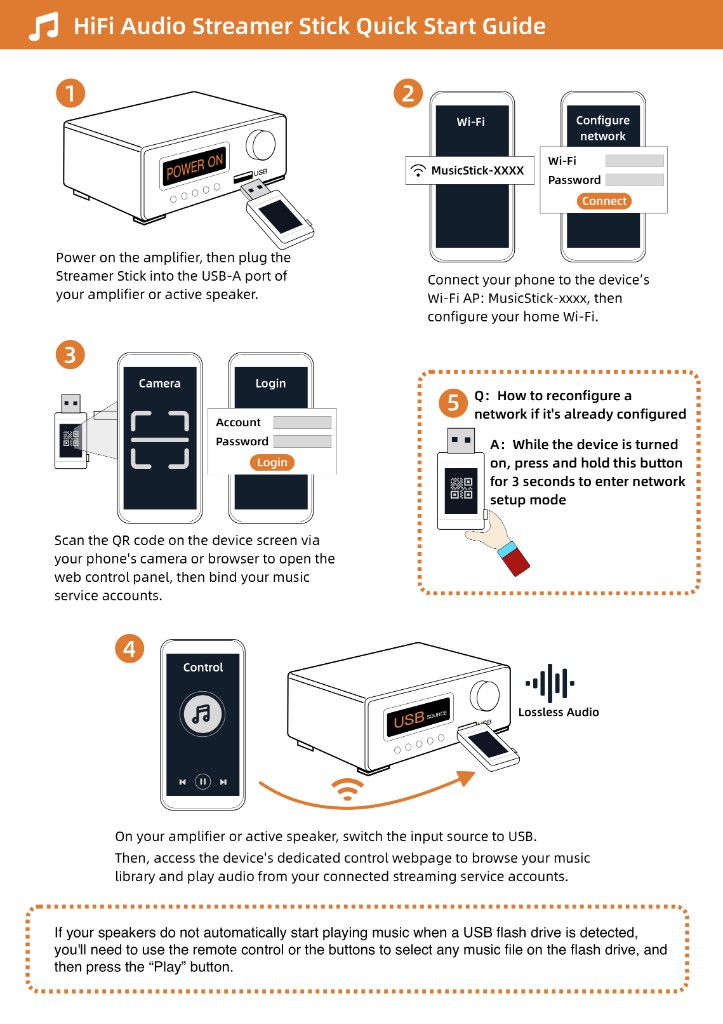
Once you confirm the port plays a flash drive, plug a Raywav Stick into it, connect it to the shop Wi-Fi, and start your music subscription or playlist from the browser on your phone. From the second you tap play, the stick pulls the music from the internet by itself—you can answer phone calls, check messages, or walk down the street for coffee while the shop music keeps playing without a single hiccup.