How do I listen to podcasts on my home speaker without tying up my phone for an hour?
Streaming a 50-minute podcast from your phone over Bluetooth means every phone call or short video you open cuts the episode off. Let the speaker's USB port play the episode itself.
When you are cooking dinner, sorting stock in the back of a shop, or relaxing in the living room in the evening, putting on a forty-five-minute podcast is great company. Playing it out of your phone's tiny built-in speaker barely carries across the room; but the moment you connect your phone to the big stereo over Bluetooth or an audio cord, that entire hour-long episode holds your phone hostage. Right when the host gets to the best part of the story, a family member calls you—or you absentmindedly tap a ten-second video in a group chat—and the podcast booming through the living room cuts off mid-sentence.
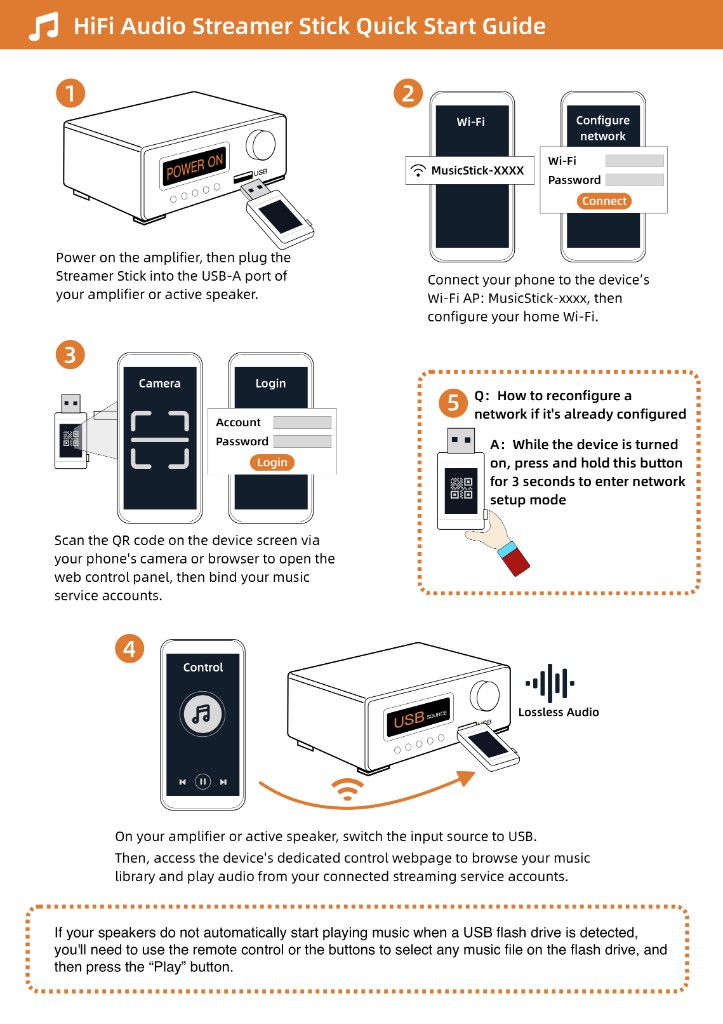
If your speaker or amplifier has a USB port that plays MP3 flash drives, you can let the stereo run those long episodes by itself. Plug a Raywav Stick into the USB socket, open the web page on your phone, and tap the podcast episode you want to hear. Once it starts, lock your phone and use it however you like—scroll through messages, watch a muted clip, or take a phone call in the hallway while the living room speaker finishes the whole episode uninterrupted. And if the show you follow is actually a daily talk program on a live radio station, you can just search for that broadcaster on internet radio and put it on directly.
The first time you set it up, stand in the room where the speaker sits and listen for a minute to make sure the Wi-Fi signal is steady there, rather than only testing next to the router. Once it is connected, you can leave a long show running for an hour or two without babysitting it.