Our shop speaker only has a USB port — how do we keep background music playing when staff take the phone?
When the counter phone runs Bluetooth music, the shop goes silent every time a staff member takes it to the back room or scans an order. Use the amp's USB port so the music runs all day by itself.
If you run a café, restaurant, or small shop, turning on background music is one of the first things you do when unlocking the door. Plenty of shop amplifiers and speakers have a USB slot right on the front, yet out of habit people still pair a counter work phone over Bluetooth or plug it into an audio cable. Then the whole shift turns into a string of interruptions: a staff member grabs that phone to check a delivery order in the back storage room, walks ten paces, and the dining room goes dead; a payment app or WhatsApp voice note pings at full volume over the ceiling speakers, ducking the music up and down; by lunch the phone battery is flat, someone unplugs it to charge, and the room sits in awkward silence.
Before you spend money replacing a working sound system just to keep music playing from open to close, do a one-minute check. Take a regular flash drive with a few MP3 songs on it and plug it into the USB port on the shop amp.
If the speakers start playing, the unit already has its own player inside—many commercial amps even have play and pause buttons right on the face. If plugging in the stick gives you complete silence, audio techs usually check three things first: whether the `MODE` button on the front panel is still stuck on `AUX` line-in instead of `USB`; whether the flash drive is formatted as `FAT32` on a computer (most older boxes ignore `NTFS`); and whether that socket is just a 5V phone charger with no audio wiring behind it.
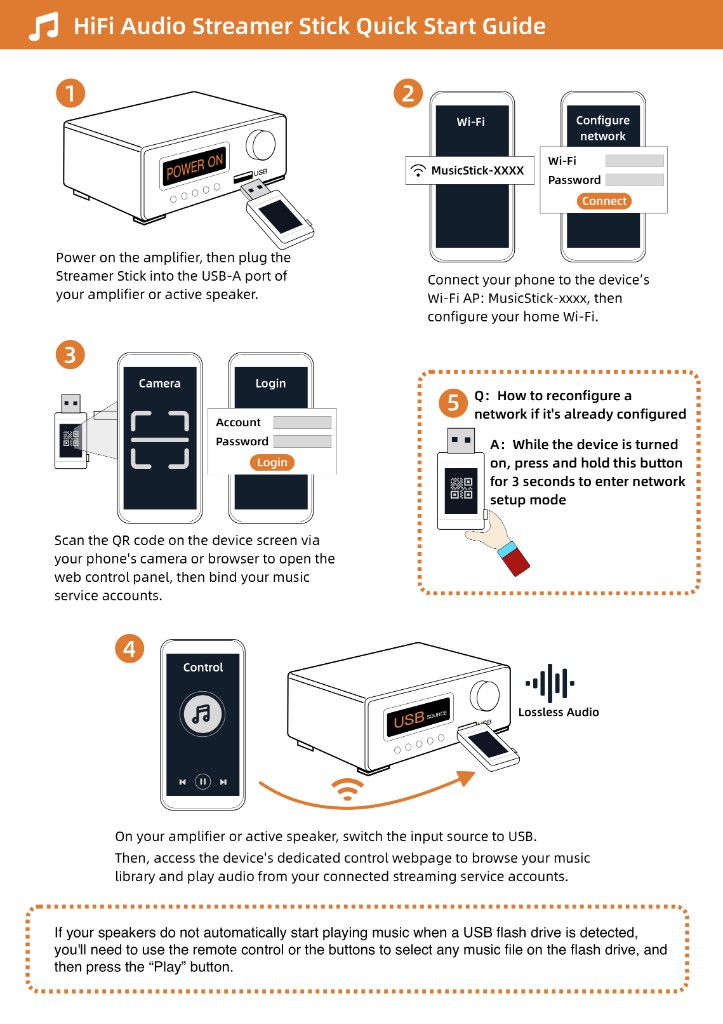
Once a normal stick plays, put the Raywav Stick into that same USB port and connect it to the shop's `2.4 GHz` Wi-Fi. Open the browser on a phone, start a radio station or playlist, and leave it alone—the stick takes its power from the amp and plays all day while staff use the counter phone however they need. Instrumental sets, light pop, or a steady local broadcast work well for hours without tiring people out; you can pick a stream on internet radio and jot down a couple of backup station names by the till. With partition walls and big metal fridges in a shop, `2.4 GHz` holds up much better than `5 GHz`, and keeping the stick on the outside of the amp rather than locked inside a sealed steel cabinet keeps the signal clean.