Our amplifier is locked inside a metal rack — why does internet radio keep stuttering when we close the door?
Your phone shows full Wi-Fi bars standing outside the cabinet, yet the stream cuts out the moment the steel rack door shuts. Moving the stick a few inches fixes the shielding problem.
In lots of restaurants, shops, and community halls, the amplifier and microphone receivers are tucked neatly inside a steel equipment rack or under a metal cash counter to keep the wiring out of sight. Then a frustrating mystery starts: standing right in front of the rack, you look at your phone and see full Wi-Fi bars—yet the moment you plug a streaming stick into the amp and swing the metal cabinet door shut, the music starts stuttering every few seconds or drops out completely. People often blame the internet provider and reboot the router three times without fixing a thing.
Your broadband is fine; the problem is that a closed steel cabinet acts like a metal bucket that blocks wireless signals. Higher-frequency `5 GHz` Wi-Fi in particular bounces right off steel doors and commercial kitchen fridges.
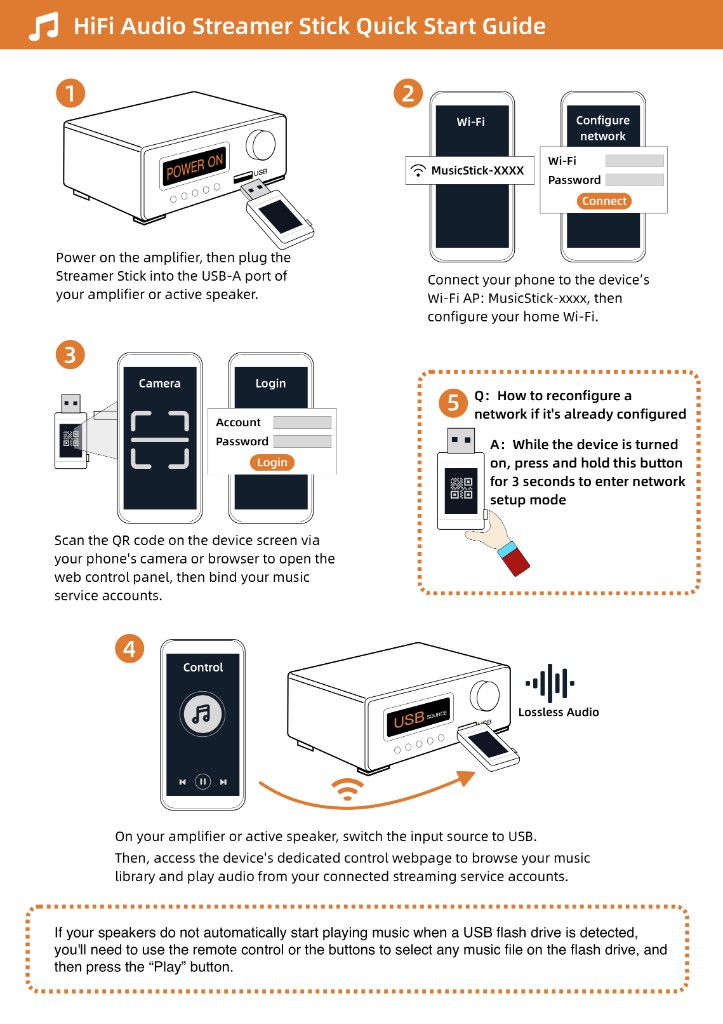
The Raywav Stick connects on `2.4 GHz` Wi-Fi, which pushes through obstacles much better, but even `2.4 GHz` struggles if the stick is plugged into the rear of an amplifier pressed flat against the back steel wall of a rack. Whenever possible, plug it into the front panel USB port, or use a short USB extension cable to bring the stick out toward the front edge of the shelf near the door gap. And if a broadcast suddenly goes quiet one afternoon, do not rush to pull the power plug on the whole rack—open internet radio and tap a second station you know works. Half the time, that first radio station's own server just hiccuped, and switching stations brings the sound right back.