I already pay for Tidal or Qobuz — how do I play it on my old amp without buying another subscription?
New smart amps often force you to install their app and sign up for a 7-day trial of a service you do not need. If your old amp has a USB port, you can log straight into the account you already pay for.
Anyone who has unboxed a new "smart" amplifier or connected speaker knows how annoying the first ten minutes can be: the manual forces you to download the manufacturer's own app, create a brand account, and click through pop-ups pushing you to put down a credit card for a "7-day free trial" of their bundled music service. Once you finally get inside, it is the exact same catalog of songs you already pay for every month on Tidal, Qobuz, or JioSaavn—and if you forget to cancel after a week, you end up paying two monthly bills for the same music.
Since you are already paying for a music subscription and have all your playlists and saved albums sitting in that account, there is no reason to hand over a card for a second one just to appease a piece of hardware. Look at the old amplifier you already own: as long as its USB port can play songs off a normal flash drive, plugging in a Raywav Stick solves the whole problem.
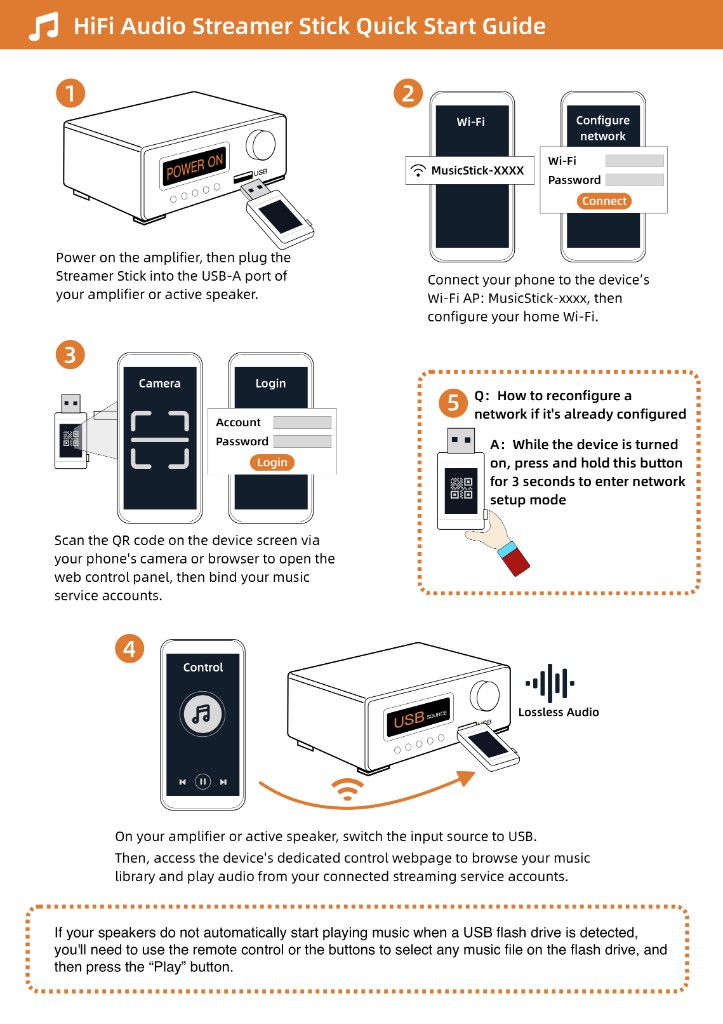
It never asks you to install a phone app or register a manufacturer account. You scan the QR code on the stick with your phone, sign straight into your existing Tidal, Qobuz, or JioSaavn account in the browser page that pops up, tap your saved playlists, and your old amp starts playing right away. And on days when you want something else, that same web page lets you play podcasts, pull music from a memory card or a home hard drive, or open internet radio to listen to live stations around the world for free—without paying a single extra subscription fee.