My old amplifier only has a USB port — how do I play Tidal and Qobuz on it directly?
Your stereo still sounds great and you do not want to spend hundreds on a new unit just for streaming. If the amp can play MP3s from a USB stick, you can log straight into your existing Tidal or Qobuz account.
Your old living room amplifier still has plenty of power and your speakers sound just the way you like them—the only catch is that the machine was built before streaming apps existed. When you want to listen to the Tidal or Qobuz subscription you pay for every month, you end up pairing your phone over Bluetooth. Then the moment you step onto the balcony or walk into the kitchen for a glass of water, the music in the living room stutters; and plenty of listeners hate paying for a lossless subscription only to have Bluetooth squash the audio on the way to the amp.
Spend five minutes on any audio forum and you will see endless arguments over whether Tidal or Qobuz sounds better: one person swears switching to Qobuz lifted a veil off their speakers, while the next person flips between the exact same track on both services all evening and hears zero difference. Half the time it comes down to a slow home network that night or two different studio masters of the same album, so reading strangers argue online never settles anything.
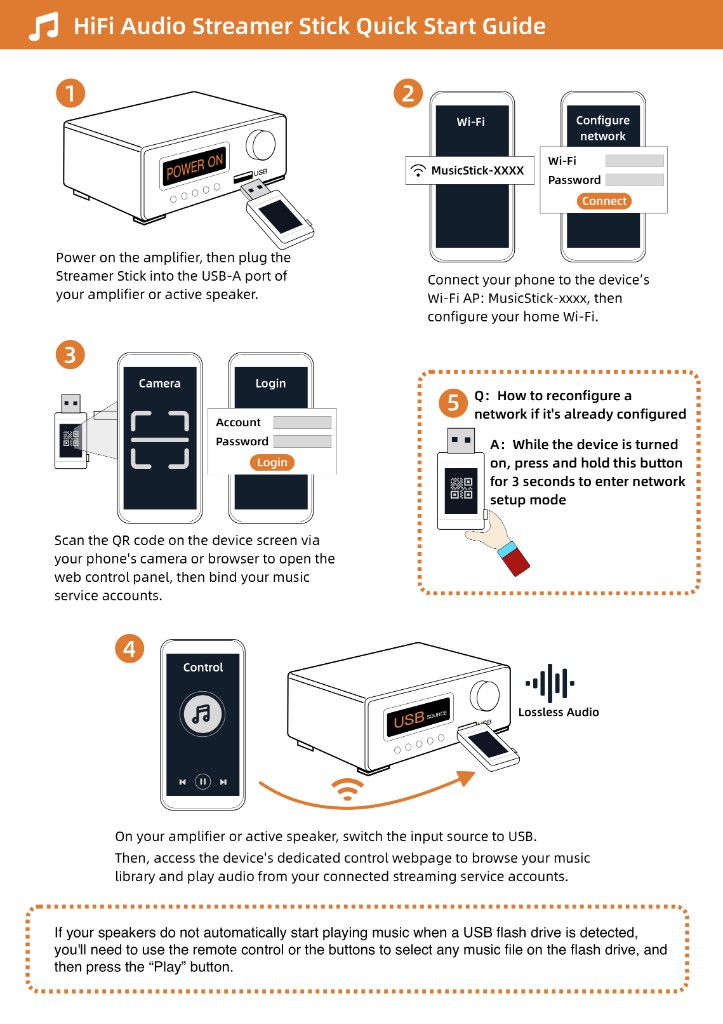
Since you are already paying the monthly bill for one of them, there is no need to spend hundreds of dollars replacing a good amplifier just to play your library properly. Grab a regular USB flash drive, drop an MP3 song onto it, and plug it into the USB port on your old amp. As long as it plays out loud, you can plug a Raywav Stick into that socket, scan its QR code with your phone, and sign straight into your existing Tidal or Qobuz account in the browser. Pick an album and tap play—the stick pulls the stream over Wi-Fi on its own, leaving your phone free to take calls or scroll through videos without interrupting the living room stereo.