My trolley speaker only has a USB port — how do I play internet radio outside?
When you play over Bluetooth at a stall or outdoor event, the music cuts out the moment the person with the phone walks away. Here is how to run internet radio straight from the USB port on a mobile hotspot.
Most wheeled trolley speakers people bring out for street markets, dance practice in the park, or school yard events were built around a simple USB stick slot, plus Bluetooth. Once you actually roll the box outside, both options show their flaws right away. With Bluetooth, the music is tied to whoever holds the phone: the vendor steps into the back to grab change or pack an order for a customer, and the speaker out front goes dead. With a normal flash drive, you are stuck looping the same thirty old MP3s all afternoon and have no way to put on live news or an online music station. And on factory floors or workshops where workers are not allowed to keep phones out on the bench, Bluetooth is off the table from the start.
If you want to run internet radio off the trolley speaker's built-in battery while keeping your phone in your pocket, do a quick check at home before you head out. Flip the speaker onto battery power and plug a regular USB stick with a couple of MP3s into its port. Some cheap boxes only use that socket to charge a phone; as long as the MP3 plays out loud, the port can read audio and you are good to go. One practical tip while you are looking at the panel: a long flash drive sticking out of a trolley box is easy for someone to kick or snap off while carrying gear, so if your speaker also has a little `microSD` slot, keep your offline backup songs on a card instead.
Once you get to the stall or yard, use the shop Wi-Fi by the door or turn on a `2.4 GHz` hotspot on a phone (`2.4 GHz` reaches much further across a crowded yard or around walls than `5 GHz`). Before people show up, open internet radio, test one news station and one music station until you hear them play, and save both. Having a working backup station ready beats scrolling through hundreds of untested links when a crowd is already standing around.
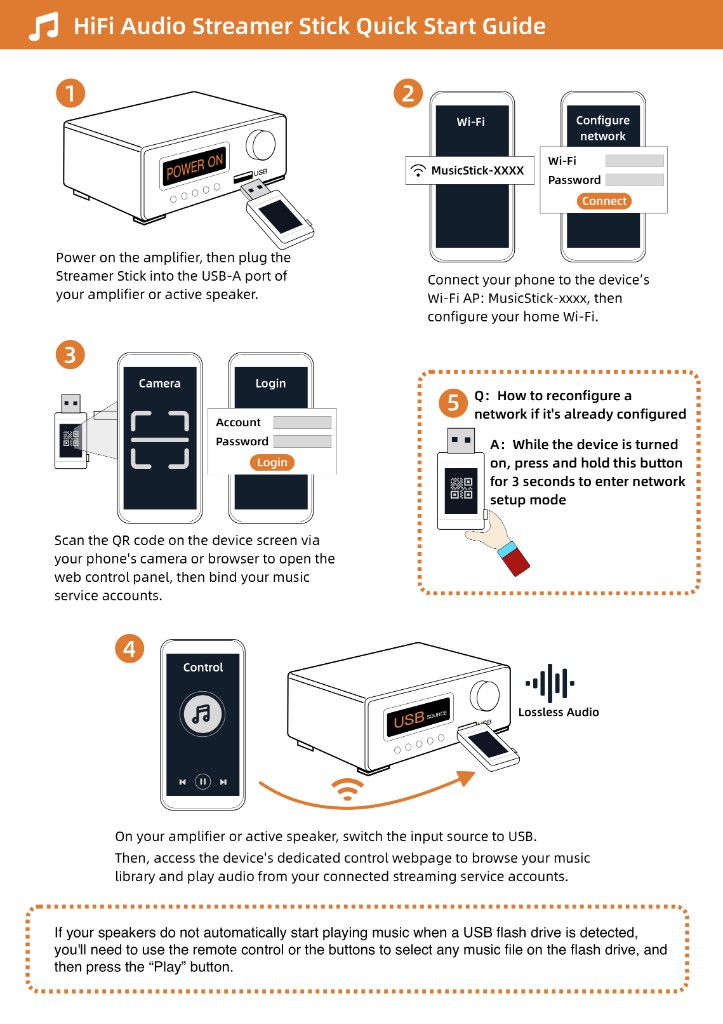
Plug the Raywav Stick into that USB socket—it draws power straight from the box's battery and joins your hotspot. Scan the QR code with your phone, tap the station in the browser, and slide the phone back into your pocket with the screen locked. The stick pulls the stream on its own. If the sound stutters later on, check whether the hotspot phone walked too far away or the metal backplate of the speaker is blocking the signal; shifting the stick slightly to the side usually clears it right up.