My old speaker only has a USB stick port — how do I play internet radio on it?
Your living room stereo or party speaker still sounds great, it just only reads USB flash drives. If that USB port plays a normal MP3 stick, it can stream live internet radio too.
Plenty of living room stereos, shop PA amplifiers, mosque sound systems, and wheeled party boxes are still in great shape and plenty loud—their only limitation is that they were built to read a USB stick. After a while you get tired of hearing the same fifty old MP3s on that flash drive and want live daily news or an online music station, but that rectangular USB port has no idea how to join Wi-Fi or Bluetooth on its own.
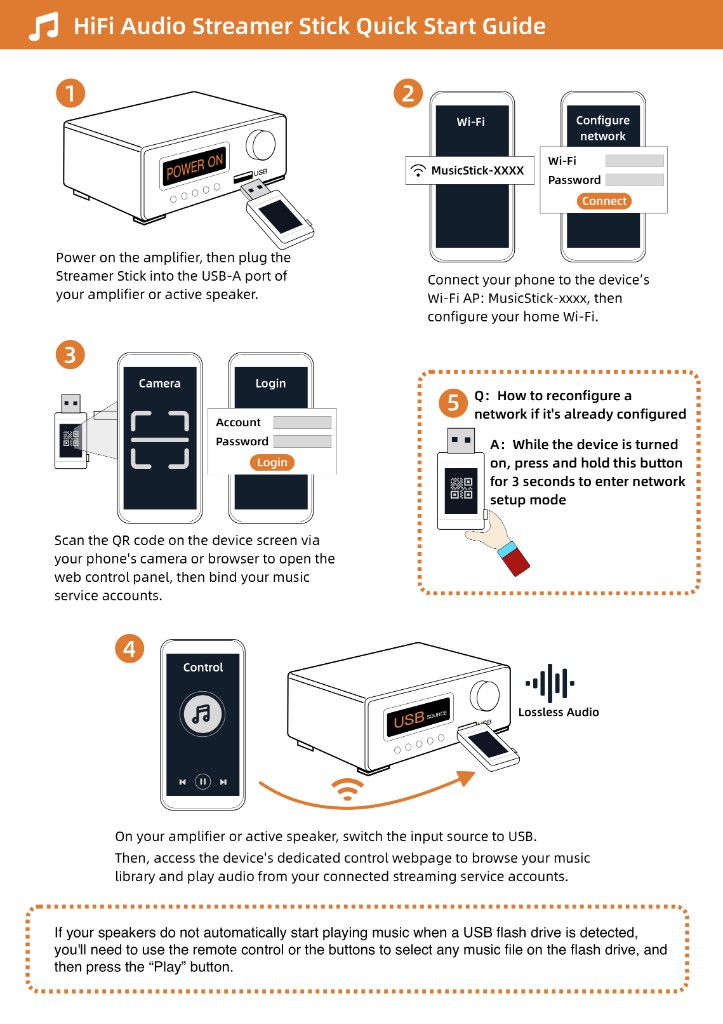
You do not need to throw out a good speaker just to hear the radio. If you plug a small Wi-Fi stick into that USB socket so it pulls the live radio stream off the internet and hands it to the speaker as if it were files on a flash drive, your old machine can play stations from anywhere in the world. That is exactly what the Raywav Stick does: it powers itself from the speaker's USB port, you scan the QR code on its shell with your phone, tap the station you want in the web page that opens, and then lock your phone and walk away. The big speaker keeps playing on its own, and you do not even have to install an app.
If you do not have a station link handy, open internet radio to browse live broadcasts you can test with a tap. If a stream ever goes down one afternoon, you can follow the link to that broadcaster's own website to grab an alternate stream, and save your regular news, music, Quran recitation, or hometown stations as favorites.
Before you plug it in, there are only two quick things to check at home:
- First, take any ordinary USB stick with MP3 songs on it and see if your speaker plays it today. If the drive opens fine on a computer but the speaker ignores it, reformat the stick to `FAT32` on the computer and try again; if even a basic `FAT32` MP3 stick never makes a sound, that port is likely a charge-only socket and cannot play audio.
- Second, check that Wi-Fi reaches the spot where the speaker sits. If the router is a room away behind a wall, connecting on `2.4 GHz` reaches much further and drops far less often than `5 GHz`.